The financial enterprises have very less time in implementing software to achieve value and ROI. In Retail Banking, the business requirements are to drive revenue, increase operational efficiency, manage risk and retain the most valuable customers.
Go through the following Performance Blueprints offered by IBM which combine the power of IBM Cognos 8 BI for reporting, analysis, scorecards and more.
Retail Branch Banking Performance:
http://www-01.ibm.com/software/uk/data/cognos/solutions/banking/retail-branch-performance.html
Retail Banking Customer Segment:
http://www-01.ibm.com/software/analytics/banking/retail-banking-customer-segment.html
To see the complete Cognos solutions for retail banking, attend the IBM Software Universe 2011 event which includes a session on Retail Banking Analytics.
Wednesday, October 5, 2011

Wednesday, September 28, 2011
More information on IBM SWU 2011
Articles from www.ibmsoftwareindia.com:
http://www.ibmsoftwareindia.com/home/why-now-software-universe-2011-and-the-next-big-wave/
http://www.ibmsoftwareindia.com/home/dont-miss-ibm-software-universe-2011/
From turbotodd.wordpress.com:
http://turbotodd.wordpress.com/2011/09/28/navigating-the-tech-cosmos-ibm-software-universe-india/
http://www.ibmsoftwareindia.com/home/why-now-software-universe-2011-and-the-next-big-wave/
http://www.ibmsoftwareindia.com/home/dont-miss-ibm-software-universe-2011/
From turbotodd.wordpress.com:
http://turbotodd.wordpress.com/2011/09/28/navigating-the-tech-cosmos-ibm-software-universe-india/
IBM Cognos Mobile - BI on the Go
If your need is to explore, analyze and share IBM Cognos Business Intelligence content from anywhere you are, IBM Cognos Mobile is the solution. You can access the same reports and gain insights in the same way as you do with IBM Cognos BI. The mobile solution is reliable and secure. It does not matter weather you are online or offline, you can work with rich and visually compelling BI content anywhere. This increases productivity and makes the mobile decision-making simple like never before.
Here is a small demo on IBM Cognos Mobile:
http://www-01.ibm.com/software/analytics/cognos/mobile/trials-demos.html
If you are keen on seeing industry leading solutions with Cognos Mobile, attend the BI on the Go session in IBM Software Universe 2011. Here are the details of the session:
http://www-07.ibm.com/events/in/softwareuniverse/information_analytics.html
Navigate to the following site for more details on IBM Cognos Mobile:
http://www-01.ibm.com/software/analytics/cognos/mobile/
Here is a small demo on IBM Cognos Mobile:
http://www-01.ibm.com/software/analytics/cognos/mobile/trials-demos.html
If you are keen on seeing industry leading solutions with Cognos Mobile, attend the BI on the Go session in IBM Software Universe 2011. Here are the details of the session:
http://www-07.ibm.com/events/in/softwareuniverse/information_analytics.html
Navigate to the following site for more details on IBM Cognos Mobile:
http://www-01.ibm.com/software/analytics/cognos/mobile/
IBM Software Universe 2011 - What is in it for you ?
The 7th IBM Software Universe event is due in the next 20 days, it is time to see what the softwares can do for your organisation. The participants of the earlier editions of IBM Software Universe wait year long for this event, as this event is known to be India's largest software expo. The highlight of this years event will be the Solutions Expo which falls in the must-not-miss category and consists of hands-on and the solution-specific demos for different IBM softwares. There are 7 in-depth tracks which are being planned - Information & Analytics, Integration and Business Process Management, Intrastructure Management, Security & Risk, Collaboration, Software & Product Innovation and Smarter Commerce. These tracks are on diverse technologies and at a level of detail unmatched in the industry. For example, the Information & Analytics track will include a demo on Retail Banking Analytics which helps banks to drive revenue, increase operational efficiency, manage risk and retain the most valuable customers. This demo consists of 350+ pre-defined Reports and Dashboards to make decision making simpler for Retail Banking. There will also be an interesting demostration of the capabilities of IBM Cognos Mobile in this Information & Analytics track.
For more details on Solution Expo, please visit the following link:
http://www-07.ibm.com/events/in/softwareuniverse/showcase.html
If you are willing to interact with IBM subject matter experts and gain insights on industry best practices, this is the oppotunity for you. This is undoubtedly the best technical learning ground for the software professionals in India.
The following link has the agenda for the event:
http://www-07.ibm.com/events/in/softwareuniverse/agenda.html
Here is the link where you can register for this most awaited software event for 2011:
https://www-07.ibm.com/events/in/softwareuniverse/register1.html
For more details on Solution Expo, please visit the following link:
http://www-07.ibm.com/events/in/softwareuniverse/showcase.html
If you are willing to interact with IBM subject matter experts and gain insights on industry best practices, this is the oppotunity for you. This is undoubtedly the best technical learning ground for the software professionals in India.
The following link has the agenda for the event:
http://www-07.ibm.com/events/in/softwareuniverse/agenda.html
Here is the link where you can register for this most awaited software event for 2011:
https://www-07.ibm.com/events/in/softwareuniverse/register1.html
Thursday, September 22, 2011
Some new Technotes
1. How to format a crosstab measure in Report Studio based on another crosstab measure?
https://www-304.ibm.com/support/docview.wss?uid=swg21394280
2. How to use "Get Data Later" feature in Analysis Studio?
https://www-304.ibm.com/support/docview.wss?uid=swg21395045
https://www-304.ibm.com/support/docview.wss?uid=swg21394280
2. How to use "Get Data Later" feature in Analysis Studio?
https://www-304.ibm.com/support/docview.wss?uid=swg21395045
Sunday, September 18, 2011
IBM Cognos Certifications
Here is the complete list of available IBM Cognos certifications:
http://www-03.ibm.com/certify/certs/ba_index.shtml
http://www-03.ibm.com/certify/certs/ba_index.shtml
Saturday, September 17, 2011
Useful Cognos Documentation Links
IBM Cognos 10 BI Documentation
http://publib.boulder.ibm.com/infocenter/cbi/v10r1m0/index.jsp
IBM Cognos 8 BI Documentation
IBM Cognos 8.4:
http://publib.boulder.ibm.com/infocenter/c8bi/v8r4m0/index.jsp
IBM Cognos 8.3:
http://www-01.ibm.com/support/docview.wss?uid=swg27014543
IBM Cognos Planning 10 Documentation
http://publib.boulder.ibm.com/infocenter/cogic/v1r0m0/index.jsp
IBM Cognos Planning 8 Documentation
IBM Cognos Planning 8.4:
http://publib.boulder.ibm.com/infocenter/c8fpm/v8r4m0/index.jsp
IBM Cognos Planning 8.3:
https://www-304.ibm.com/support/docview.wss?uid=swg27014611
TM1 9.5 Documentation
http://publib.boulder.ibm.com/infocenter/ctm1/v9r5m0/index.jsp
TM1 9.4 Documentation
https://www-304.ibm.com/support/docview.wss?uid=swg27015691
Additional Links:
IBM Cognos 10.1 BI Handbook
http://www.redbooks.ibm.com/redbooks/pdfs/sg247912.pdf
IBM Cognos Proven Practices
http://www.ibm.com/developerworks/data/library/cognos/cognosprovenpractices.html
Supportlink
http://www-931.ibm.com/bin/newsletter/tool/parchive.cgi?nlId=11022
Supported Environments
http://www-01.ibm.com/support/docview.wss?rs=3528&uid=swg27014782
Supported Products
http://www-01.ibm.com/support/docview.wss?rs=3528&uid=swg27014713
http://publib.boulder.ibm.com/infocenter/cbi/v10r1m0/index.jsp
IBM Cognos 8 BI Documentation
IBM Cognos 8.4:
http://publib.boulder.ibm.com/infocenter/c8bi/v8r4m0/index.jsp
IBM Cognos 8.3:
http://www-01.ibm.com/support/docview.wss?uid=swg27014543
IBM Cognos Planning 10 Documentation
http://publib.boulder.ibm.com/infocenter/cogic/v1r0m0/index.jsp
IBM Cognos Planning 8 Documentation
IBM Cognos Planning 8.4:
http://publib.boulder.ibm.com/infocenter/c8fpm/v8r4m0/index.jsp
IBM Cognos Planning 8.3:
https://www-304.ibm.com/support/docview.wss?uid=swg27014611
TM1 9.5 Documentation
http://publib.boulder.ibm.com/infocenter/ctm1/v9r5m0/index.jsp
TM1 9.4 Documentation
https://www-304.ibm.com/support/docview.wss?uid=swg27015691
Additional Links:
IBM Cognos 10.1 BI Handbook
http://www.redbooks.ibm.com/redbooks/pdfs/sg247912.pdf
IBM Cognos Proven Practices
http://www.ibm.com/developerworks/data/library/cognos/cognosprovenpractices.html
Supportlink
http://www-931.ibm.com/bin/newsletter/tool/parchive.cgi?nlId=11022
Supported Environments
http://www-01.ibm.com/support/docview.wss?rs=3528&uid=swg27014782
Supported Products
http://www-01.ibm.com/support/docview.wss?rs=3528&uid=swg27014713
Saturday, July 16, 2011
Creating a custom chart palette in Cognos
Adding you own custom chart palette was possible in Cognos 8 using the techniques mentioned in the following Cognos Proven Practices document:
These steps also work fine in Cognos 10, if the legacy chart engine is selected.
However, the same steps do not work for the new charts in Cognos 10, for which another Cognos Proven Practices document has been published recently:
Saturday, June 11, 2011
IBMs AQ Maturity Model. Whats your AQ?
Today organizations are trying to introduce Business Analytics to all levels of employees, so that making better decisions become a practise even at the most granular level of the organization. But, bringing Business Analytics to the fore is not a one-day task, the organizations need to understand what their current level is and the areas they can improve upon. This makes it all the more important for organizations to follow a Business Analytics maturity model.
IBM has recently launched AQ (Analytics Quotient) Maturity Model. The are four stages in this maturity model which are: Novice, Builder, Leader and Master.
To explore the AQ Maturity Model in more detail please refer to the following site:
where you can know more about
1. Whats your AQ?
2. Different stages of AQ Maturity model
3. How can you improve?
4. The tools that can help you to improve
5. Case Studies and White Papers
Further Reading:
Wednesday, May 25, 2011
Data Visualization: The future of Business Intelligence
In the past few years the importance of data visualization has come to the forefront for the Business Intelligence software. Data visualization or information visualization or visual analytics is nothing but the visual representation of important enterprise data in terms of graphs and charts. The business user's need has always been a graphical representation which makes sense and can be easily explored or analyzed so that the trends and patterns can be spotted with ease. Moreover, the graphs and charts that are seen by the upper management needs to summarize information and should provide actionable ideas to them. Considering these facts today the Business Intelligence tools are being designed with the data visualization at its core.
The focus of Business Intelligence today is shifting towards the point of view of the business users. The new kinds of charts, graphs and dashboards which became available to business analysts over the last few years is really mind-boggling. Also, the view of Business users are changing and they are not willing to only analyze the stale data in Data Warehouse instead they are looking forward to analysis of real-time data as well with the help of data visualization.
Here are some interesting visualizations from IBM. These visualizations are part of a project named Many Eyes. You can also create your own visualizations with sample data:
http://www-958.ibm.com/software/data/cognos/manyeyes/
IBM Cognos 10 has come up with completely new features like Business Insight ans Business Insight Advanced using which a business user can create his personal dashboard in a flash using the report objects (list, charts, graphs or crosstabs) from other reports. So without having to create anything the business users can today reuse their report objects into their personalized dashboards along with the ability of adding the own analysis on the top of it. This feature allows the business users to put their creativity into use.
The demos for IBM Cognos 10 Business Insight and Business Insight Advanced is available at the following link:
http://www-01.ibm.com/software/analytics/cognos/business-insight/trials-demos.html
The new kinds of charts and graphs which have been introduced in Cognos 10 is also enormous. If you have seen or used the previous versions of IBM Cognos you can realize the number of charts and graphs that has been added in Cognos 10. Here is a screenshot for the selection screen for the charts available in Cognos 10:

However, the most discussed feature in Cognos 10 is Active Reports. This functionality allows the report authors to create interactive reports for offline use (when the users are disconnected). Business users can explore the information independent of their location or network connectivity. Here is the link to the Active Reports demo from IBM:
http://www-01.ibm.com/software/analytics/cognos/business-intelligence/active-report.html
Another great addition in IBM Cognos 10 is the use to external data which enables the users to focus on the real-time data as well. A business user might be having the latest data in an excel sheet and not yet uploaded to the reporting database. Using this feature, they can analyze this data along with the current data with the data they have in data warehouse. For an overview of this feature, check the following video:
http://www.youtube.com/watch?v=UHKvw2oo1rY

The focus of Business Intelligence today is shifting towards the point of view of the business users. The new kinds of charts, graphs and dashboards which became available to business analysts over the last few years is really mind-boggling. Also, the view of Business users are changing and they are not willing to only analyze the stale data in Data Warehouse instead they are looking forward to analysis of real-time data as well with the help of data visualization.
Here are some interesting visualizations from IBM. These visualizations are part of a project named Many Eyes. You can also create your own visualizations with sample data:
http://www-958.ibm.com/software/data/cognos/manyeyes/
IBM Cognos 10 has come up with completely new features like Business Insight ans Business Insight Advanced using which a business user can create his personal dashboard in a flash using the report objects (list, charts, graphs or crosstabs) from other reports. So without having to create anything the business users can today reuse their report objects into their personalized dashboards along with the ability of adding the own analysis on the top of it. This feature allows the business users to put their creativity into use.
The demos for IBM Cognos 10 Business Insight and Business Insight Advanced is available at the following link:
http://www-01.ibm.com/software/analytics/cognos/business-insight/trials-demos.html
The new kinds of charts and graphs which have been introduced in Cognos 10 is also enormous. If you have seen or used the previous versions of IBM Cognos you can realize the number of charts and graphs that has been added in Cognos 10. Here is a screenshot for the selection screen for the charts available in Cognos 10:

However, the most discussed feature in Cognos 10 is Active Reports. This functionality allows the report authors to create interactive reports for offline use (when the users are disconnected). Business users can explore the information independent of their location or network connectivity. Here is the link to the Active Reports demo from IBM:
http://www-01.ibm.com/software/analytics/cognos/business-intelligence/active-report.html
Another great addition in IBM Cognos 10 is the use to external data which enables the users to focus on the real-time data as well. A business user might be having the latest data in an excel sheet and not yet uploaded to the reporting database. Using this feature, they can analyze this data along with the current data with the data they have in data warehouse. For an overview of this feature, check the following video:
http://www.youtube.com/watch?v=UHKvw2oo1rY

Tuesday, May 24, 2011
Using old IBM Cognos 8 charts in IBM Cognos 10
Do you know you can use the older legacy charts of IBM Cognos 8 in IBM Cognos 10?
List of new charts in IBM Cognos 10:

Here are the steps that you need to carry out for this:
i. Open Report Studio with any package
ii. Navigate to "Advanced" tab under Tools->Options
iii. Make the checkbox against "Use Legacy chart Authoring" checked
iv. Click on Apply
v. Click on OK
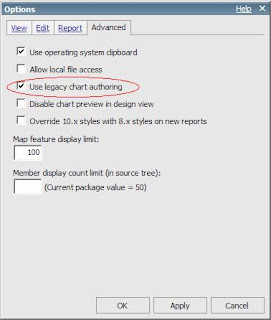
Now when you try to create a new chart report you get to see the old list that you have seen in IBM Cognos 8:

List of new charts in IBM Cognos 10:

Here are the steps that you need to carry out for this:
i. Open Report Studio with any package
ii. Navigate to "Advanced" tab under Tools->Options
iii. Make the checkbox against "Use Legacy chart Authoring" checked
iv. Click on Apply
v. Click on OK

Now when you try to create a new chart report you get to see the old list that you have seen in IBM Cognos 8:

Thursday, November 4, 2010
IBM Cognos 10 New Features Demo
Here is the link to the IBM Cognos 10 New Features, the demo elaborates on the new features that has been introduced in IBM Cognos 10:
http://public.dhe.ibm.com/software/data/sw-library/cognos/demos/od_whats_new_with_ibm_cognos_business_intelligence_v101/demo.html
http://public.dhe.ibm.com/software/data/sw-library/cognos/demos/od_whats_new_with_ibm_cognos_business_intelligence_v101/demo.html
Wednesday, August 4, 2010
Where to find IBM Cognos Technotes? Where to go first when you hit an error in IBM Cognos?
The new IBM support portal is the place to go when you an error or you need to search for a IBM Cognos Technote. You will need to select the product for which you want to search, put the search string and start your search.
Link to new IBM support portal -
http://www.ibm.com/support/entry/portal
Technote Search Best Practices -
http://www-01.ibm.com/support/docview.wss?uid=swg21373237
Link to new IBM support portal -
http://www.ibm.com/support/entry/portal
Technote Search Best Practices -
http://www-01.ibm.com/support/docview.wss?uid=swg21373237
Supported Environments for IBM Cognos
The supported environment pages list the softwares that are supported with different IBM Cognos products. These are the links that you should look for when you are planning a new install or need to check the different softwares that can work in tandem with IBM Cognos products.
Link to Supported Environment page for Cognos products -
These links only list the current supported versions for IBM Cognos products. For example, you will find only the latest versions under IBM Cognos 8 BI : 8.3, 8.4 and 8.4.1.
Friday, July 9, 2010
The main log file for Cognos 8 BI
The main log file in IBM Cognos 8 BI is cogserver.log file. This file can be located in the "../logs" directory. Depending on the tracing / logging levels information is logged in this file. In case you are getting any issue while running Cognos application, this is one of the starting points for you to start troubleshooting the issue.
For IBM Cognos Reportnet the file main log file is known as crnserver.log, this file is also located in the "../logs" directory for your reportnet installation.
Accessing Cognos without a web server
Running IBM Cognos without a web server:
One of tricks that you can use in IBM Cognos is to run the Cognos application without a Web Server. For this you can use the dispatcher URI mentioned in the Cognos Configuration. Once you access the dispatcher URI for the first time you will not see any graphics. To load the graphics / images you will need to carry out the following steps:
a. Copy the contents of the directory "/webcontents/"
b. Paste the contents to the directory "/webapps/p2pd/"
Once this is done, you will be able to use Cognos without using a webserver. This method is only used when your application is not configured with the webserver or the webserver is not functioning correctly.
Further Reading: http://www-01.ibm.com/support/docview.wss?uid=swg21339260
First Technical Blog !!
This is the first time I am trying to write some Technical stuff in the blog, this has been a long cherished dream though. Primarily, I am planning to write stuff about IBM Cognos.
Wednesday, June 16, 2010
Starting Time
Everything has to start and end at some time. Start and End are the constants, 'Everything' being the variant. :)
Subscribe to:
Posts (Atom)